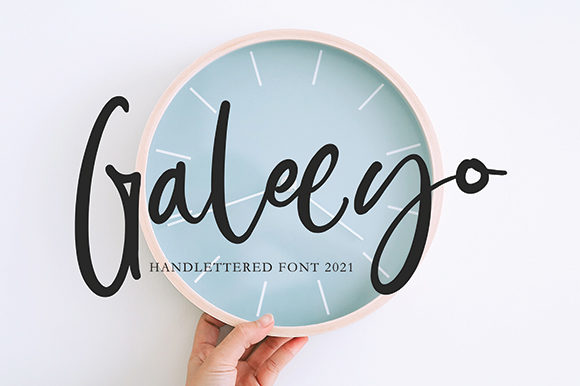
Galeeyo: A Handwritten Font for Creative Web Design
Galeeyo is a sweet and friendly handwritten font that brings a natural, unique style to your digital designs. Its charm and versatility make it an excellent choice for web designers, UI designers, and digital product creators looking to add a personal touch to their projects.
Visual Characteristics and Personality
Galeeyo's flowing, hand-drawn lines give it a warm, approachable feel. This handwritten font is perfect for adding a human element to your designs, making them more relatable and engaging. Its natural, organic style can complement a wide range of design aesthetics, from casual and playful to elegant and refined.
Using Galeeyo in Web Design
Galeeyo's unique personality makes it ideal for various elements in web design:
- Website Headers and Hero Sections: Use Galeeyo for welcoming, eye-catching titles that set the tone for the rest of the page. Its handwritten style can make your site feel more personal and inviting.
- Landing Pages and Call-to-Action Areas: Incorporate Galeeyo for short, impactful phrases that encourage user engagement. The font's distinct style can help draw attention to important messages and buttons.
- Online Shop Banners and Product Descriptions: Add a touch of creativity to your e-commerce pages by using Galeeyo for headings and decorative accents. This can help create a memorable and unique shopping experience.
- Blog Graphics and Social Media Posts: Enhance your blog headers and social media graphics with Galeeyo. Its handwritten style can make your content stand out and feel more authentic.
Readability and Visual Hierarchy
While Galeeyo is visually appealing, it's essential to use it judiciously to maintain readability and visual hierarchy. Here are some tips:
- Hero Titles and Section Headings: Use Galeeyo for larger, more prominent text where its unique style can shine without overwhelming the reader. This is especially effective for titles and headings that need to grab attention.
- Short Phrases and Decorative Accents: Employ Galeeyo for shorter, less critical text elements like subheadings, quotes, or decorative accents. This helps to add a creative touch without sacrificing readability.
- Avoid Long Body Text: For longer passages, consider pairing Galeeyo with a clean, simple sans serif font for body copy. This ensures that the main content remains easy to read while still benefiting from the decorative flair of Galeeyo.
Responsive Design and Mobile Readability
When designing for mobile screens, it's crucial to ensure that Galeeyo remains legible and visually appealing. Here are some practical tips:
- Adjust Font Size and Line Height: Increase the font size and line height for better readability on smaller screens. This helps to prevent the text from appearing too cramped and difficult to read.
- Use High Contrast Colors: Ensure that the text color provides enough contrast against the background. This is particularly important for dark backgrounds, where lighter text can sometimes be hard to read.
- Test on Multiple Devices: Regularly test your designs on different devices to ensure that Galeeyo looks good and reads well across all screen sizes.
Font Pairing for Web Design
To create a balanced and professional look, pair Galeeyo with complementary fonts. Here are some suggestions:
- Sans Serif Fonts: Combine Galeeyo with a clean, modern sans serif font like Arial, Helvetica, or Roboto for body text. This creates a nice contrast and maintains readability.
- Serif Fonts: For a more editorial and sophisticated look, pair Galeeyo with a classic serif font like Georgia or Times New Roman. This combination works well for blogs, magazines, and other content-heavy sites.
- Other Script Fonts: If you want to keep the handwritten feel, consider using a simpler script font alongside Galeeyo. Just be sure to use them sparingly to avoid overwhelming the design.
Commercial Licensing and Usage
When using Galeeyo for commercial projects, it's important to check the licensing terms. Most premium fonts, including Galeeyo, come with specific usage rights. Make sure to review the license agreement to ensure that you are using the font legally and appropriately for your website, client projects, online stores, and digital templates.
By following these guidelines, you can effectively incorporate Galeeyo into your web designs, creating a unique, engaging, and professional look that resonates with your audience. Whether you're designing a creative portfolio, a boutique online store, or a coaching website, Galeeyo can help you achieve a distinctive and memorable brand identity.